|
|
Online Help |

| Help Table of Contents |
Setting Site Preferences
You can customize and view the following administrative options in the My Preferences window:
- My Information
- My Favorites
- Dashboard Shortcuts
- Author Toolbar (Website Administrator only)
- Advanced CLO Options
- My Starting Website
To display the My Preferences page:
- In the top, right-hand corner of the page, click the User Name drop-down list, and select Preferences. The My Preferences window displays.
My Information
My Information displays your basic data: name and email address. You cannot modify this data.
My Favorites
The My Favorites area allows you to rename, reorder, and delete items in the Favorites menu.
Dashboard Shortcuts
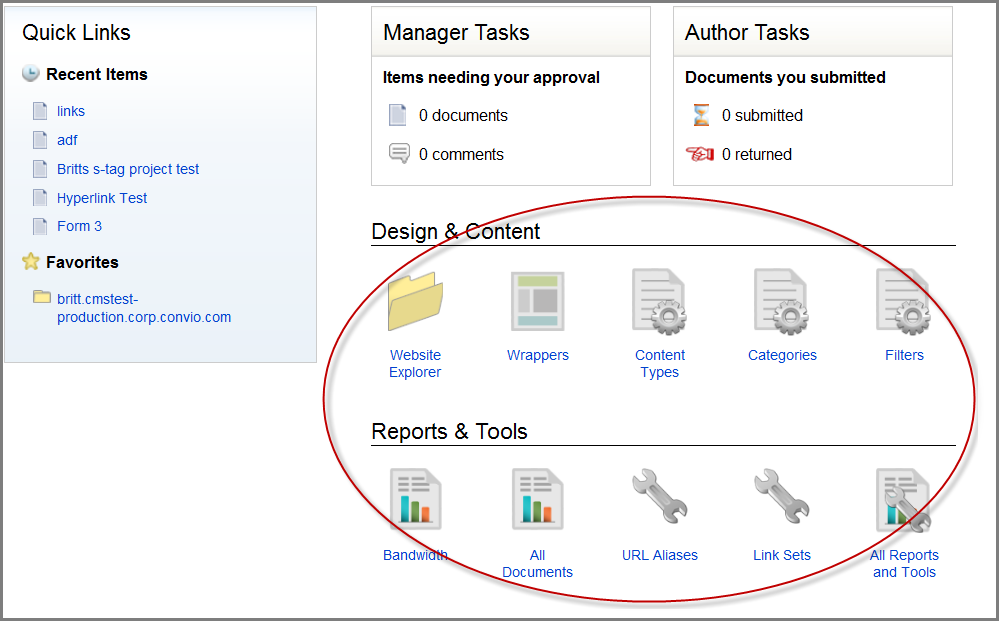
The Dashboard Shortcuts area allows you to customize the items that display in the Design & Content and the Reports & Tools area of the Workspace.
Author Toolbar
With this setting, you can enable the Author Toolbar. The Author Toolbar allows you to edit a site directly from a live web page. See Using the Author Toolbar for details.
Advanced CLO Link Options
This setting enables the Advanced Options dialog to display when you add a hyperlink to Convio Items in the Visual Editor. The advanced options allow you to append details to the URL that give you more information about the person who clicked the link and how they arrived at a page. You can add the constituent's interests, a promotion code, or additional arguments. For details, see Creating Hyperlinks.
To turn the Advanced CLO Link Options on:
- Click the Always show advanced options for links to other CLO items
button. The message above the button changes to "Always
show advanced options for links to other CLO items".
Now, when you add a Convio link using the Hyperlink tool in the Visual Editor, the Advanced Options dialog displays.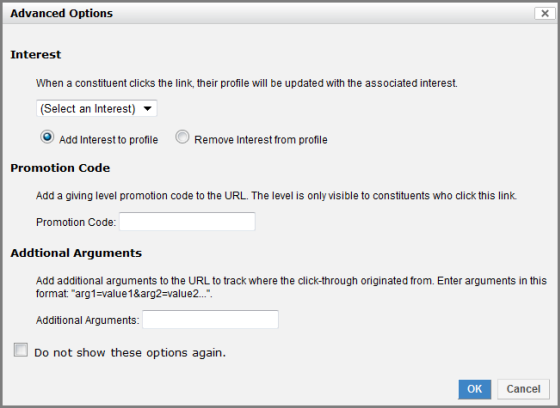
My Starting Website
In the My Starting Website area, you specify the site (host) that displays when you first log in. The list of hosts available should be consistent with the list of hosts in the CMS menu (CMS > Switch Hostgroups) and are limited to those where you have a defined role.